

MQTT Publish
Publish messages to MQTT topics from your workflows.
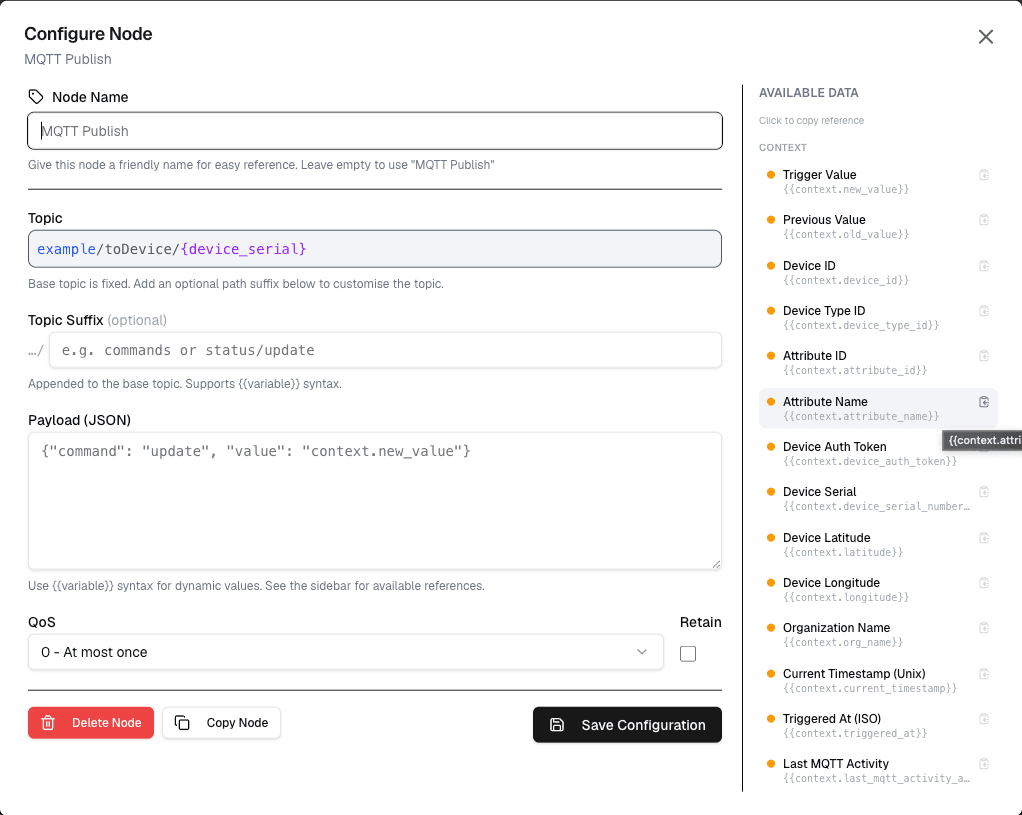
The MQTT Publish node sends messages to an MQTT topic when the workflow runs. This is the primary way to send commands or data back to devices.
Overview
The MQTT Publish node uses the device's MQTT credentials to publish messages to any topic the device has access to.
How It Works
- Configure the topic path and message payload
- The node publishes the message to the MQTT broker when the workflow runs
- Any device subscribed to that topic receives the message
Configuration
| Setting | Description |
|---|---|
| Topic | The MQTT topic to publish to |
| Payload | The message payload (JSON or plain text) |
| QoS | Quality of Service level (0 or 1) |
| Retain | Whether to retain the message on the broker |
Topic Format
Use the standard MQTT topic structure:
{tenant_slug}/toDevice/{serial_number}Using Variables in Topics
You can use workflow variables in the topic path:
mycompany/toDevice/{device.serial}This allows dynamic topic selection based on workflow input.
Payload Examples
JSON Payload
{
  "command": "setTemperature",
  "value": 22.5,
  "timestamp": "2026-06-16T17:00:00Z"
}
Using Variables in Payload
{
  "temperature": {temperature},
  "humidity": {humidity},
  "action": "update"
}
Variables are replaced with actual values when the workflow runs.
Use Cases
- Device commands — Send configuration changes to devices
- Data updates — Push data back to devices
- Control signals — Trigger actions on connected equipment
- Status updates — Send status information to devices
Example: Temperature Control
Node: MQTT Publish
  Topic: mycompany/toDevice/SENSOR-001
  Payload: {
    "command": "setTargetTemperature",
    "value": {targetTemp}
  }
  QoS: 1
Best Practices
- Use QoS 1 for important commands that must be delivered
- Use QoS 0 for non-critical data where occasional loss is acceptable
- Always validate topic paths before publishing
- Include timestamps in messages for audit purposes
Limitations
- The topic must be one the device certificate has permission to publish to
- Message size is limited by MQTT broker constraints (typically 256KB)
- Each workflow execution publishes the message once
Next Steps
Connect data nodes before MQTT Publish to prepare the message payload, or use it alongside Notification nodes for complete automation workflows.