

Array Operation
Perform operations on arrays in your workflows.
The Array Operation node performs operations on array data, such as filtering, sorting, and extracting values. This is essential for processing collections of data.
Overview
The Array Operation node allows workflows to manipulate arrays of data — for example, filtering historical readings or extracting specific values from a dataset.
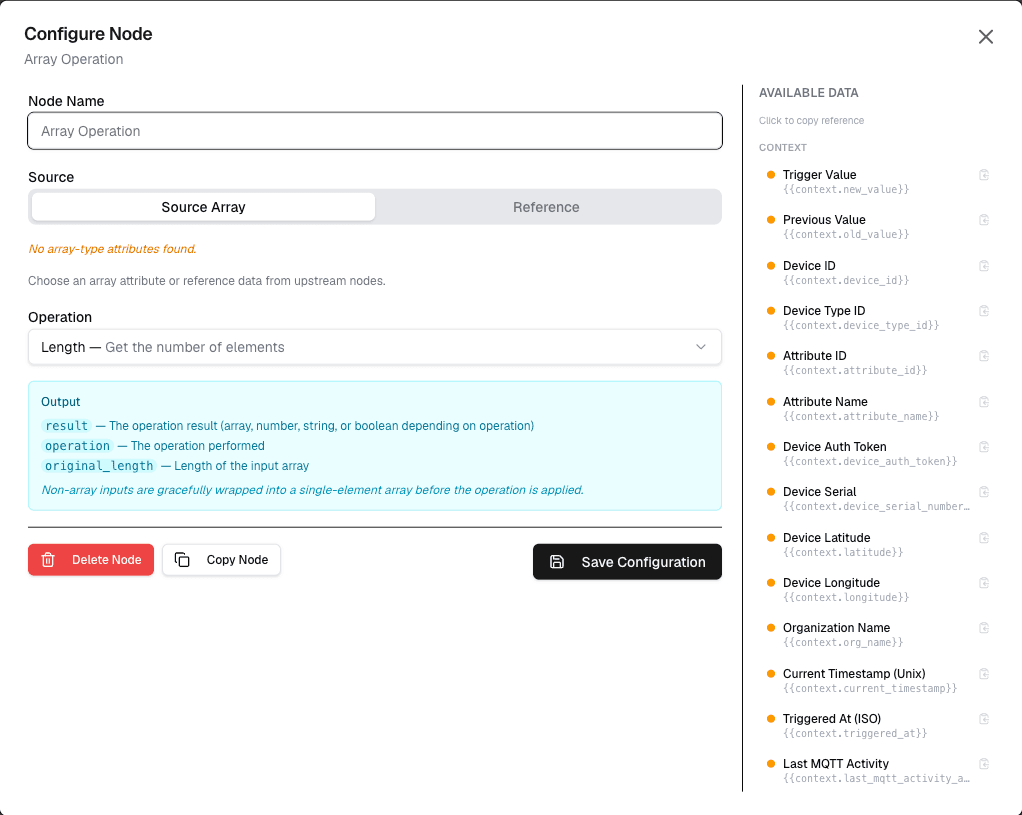
How It Works
- Provide an input array (from Get History or other data nodes)
- Configure the operation to perform on the array
- The result is passed to connected nodes
Configuration
| Setting | Description |
|---|---|
| Input Array | The array to operate on (or variable) |
| Operation | Type of operation to perform |
| Filter | Optional filter condition |
| Result | Output variable name |
Supported Operations
| Operation | Description | Example |
|---|---|---|
| Filter | Keep items matching condition | value greater than 30 |
| Sort | Sort by field or value | ascending |
| Map | Transform each item | value * 1.8 |
| Reduce | Aggregate to single value | sum, average |
| Unique | Remove duplicates | distinct |
| Slice | Get subset of array | first 10 items |
Use Cases
- Data filtering — Keep only values above threshold
- Aggregation — Calculate sum, average, min, max
- Data transformation — Convert units for all items
- Deduplication — Remove duplicate readings
Example: Filter and Average
Node: Get History
  Datastream: "temperature"
  Time Range: Last 24 hours

Node: Array Operation
  Input: {history}
  Operation: Filter
  Condition: value > 30

Node: Array Operation
  Input: {filtered}
  Operation: Reduce
  Function: average

→ Result: highTempAverage
Best Practices
- Always check if input array is empty before operations
- Use filter operations to reduce data early in the workflow
- Document expected array structure
- Handle edge cases (empty results, null values)
Limitations
- Large arrays may impact workflow performance
- Complex operations require multiple nodes
- Memory is limited per workflow execution
Next Steps
Connect array operation output to action nodes for processing filtered data, or to calculation nodes for aggregations.