

Get Attribute
Retrieve device attributes for use in workflow processing.
The Get Attribute node retrieves attribute values from a device. Attributes are metadata associated with devices, such as location, firmware version, or custom properties.
Overview
The Get Attribute node allows workflows to read device attributes, providing context for decision-making and data processing.
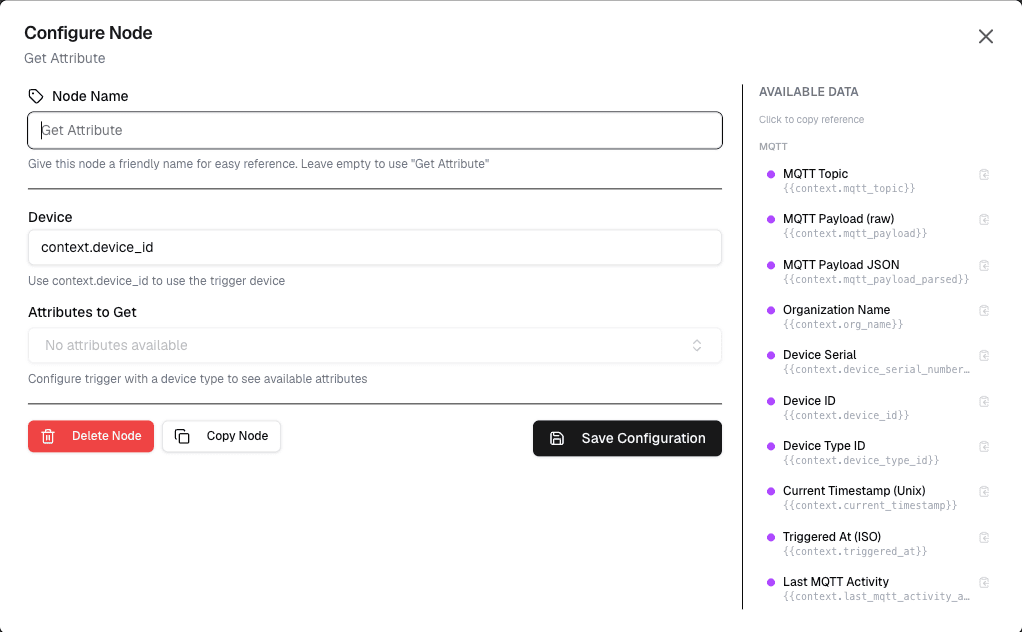
How It Works
- Select the target device and attribute name
- The node retrieves the current attribute value
- The value is passed to connected nodes
Configuration
| Setting | Description |
|---|---|
| Device | Select the target device |
| Attribute | Select or enter the attribute name |
Use Cases
- Context-aware automation — Use device location to determine alert recipients
- Conditional logic — Branch workflow based on device properties
- Reporting — Include device metadata in reports
- Routing — Route data based on device attributes
Example: Location-Based Routing
Node: Get Attribute
  Device: {device}
  Attribute: location

→ Workflow uses location to route to correct dashboard
→ Workflow sends notification to local team
Best Practices
- Use descriptive attribute names
- Cache frequently accessed attributes
- Handle missing attributes with default values
Limitations
- Only reads attributes set on the device
- Attribute changes require device update or manual edit
Next Steps
Connect the attribute value to condition nodes for branching logic, or to action nodes for context-aware actions.