

Timestamp Check
Evaluate and compare timestamps in your workflows.
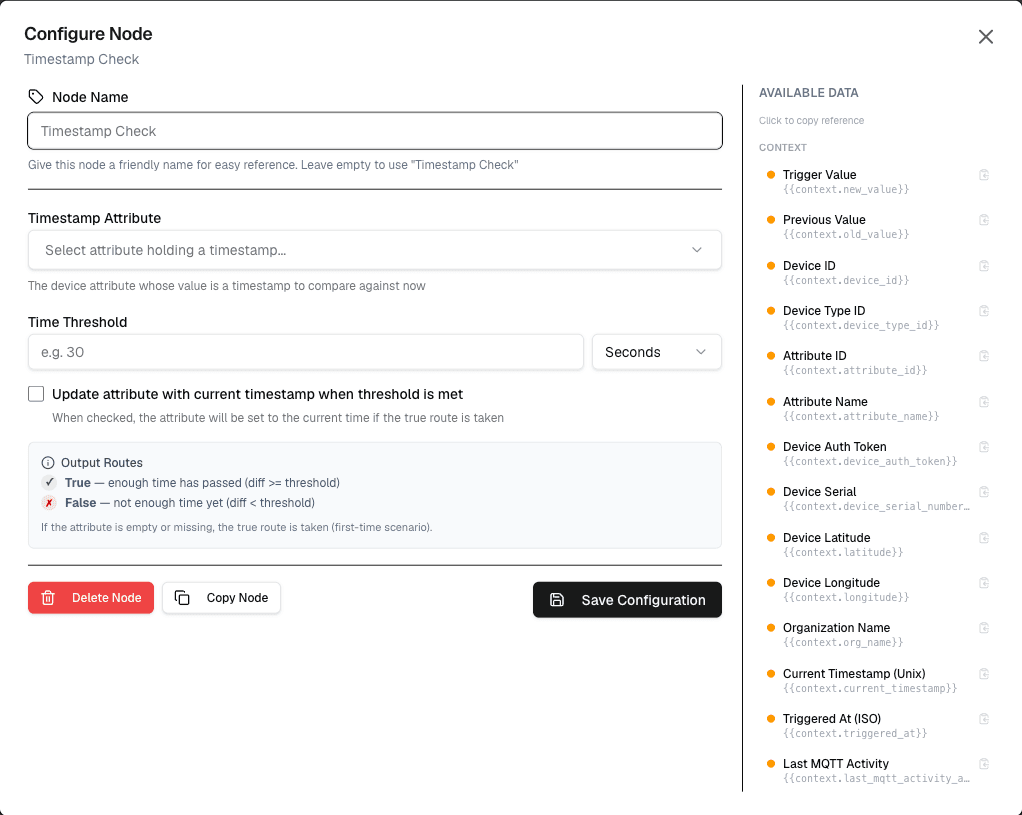
The Timestamp Check node evaluates time-based conditions, allowing workflows to make decisions based on timestamps, dates, and time intervals.
Overview
The Timestamp Check node enables time-based workflow logic, such as checking if data is stale, verifying business hours, or calculating time differences between events.
How It Works
- Provide the timestamp to evaluate (from a variable or constant)
- Configure the time condition or operation
- The node outputs the result for use in connected nodes
Configuration
| Setting | Description |
|---|---|
| Timestamp | The timestamp to evaluate (ISO format or variable) |
| Operation | Type of check or calculation to perform |
| Reference Time | Optional reference time for comparisons |
| Result | Output variable name |
Supported Operations
| Operation | Description | Example |
|---|---|---|
| Is Stale | Check if timestamp is older than N minutes/hours | lastUpdate greater than 30min |
| Is Within | Check if timestamp is within a time range | businessHours |
| Time Difference | Calculate difference between two timestamps | diffMinutes |
| Is Business Hours | Check if timestamp falls within business hours | isWorkday |
| Is Weekend | Check if timestamp falls on weekend | isWeekend |
| Format | Convert timestamp to different format | formattedDate |
Use Cases
- Data freshness — Alert if data hasn't been updated recently
- Business logic — Only process during business hours
- Time calculations — Calculate uptime, response time, duration
- Scheduled actions — Trigger based on time of day
Example: Data Freshness Check
Node: Timestamp Check
  Timestamp: {lastDataReceived}
  Operation: Is Stale
  Threshold: 60 minutes

If stale → Send alert
If fresh → Continue processing
Example: Time Difference
Node: Timestamp Check
  Timestamp A: {startTime}
  Timestamp B: {endTime}
  Operation: Time Difference
  Unit: minutes

→ Result: durationMinutes
Best Practices
- Always use ISO 8601 format for timestamps
- Handle null/missing timestamps gracefully
- Consider timezone differences in comparisons
- Test edge cases (midnight, DST changes)
Limitations
- Timestamps must be in valid ISO format
- Timezone handling depends on platform configuration
- Very old timestamps may have precision issues
Next Steps
Connect the timestamp check output to condition nodes for branching, or to action nodes for time-based alerts.