

Notification
Send notification alerts from your workflows.
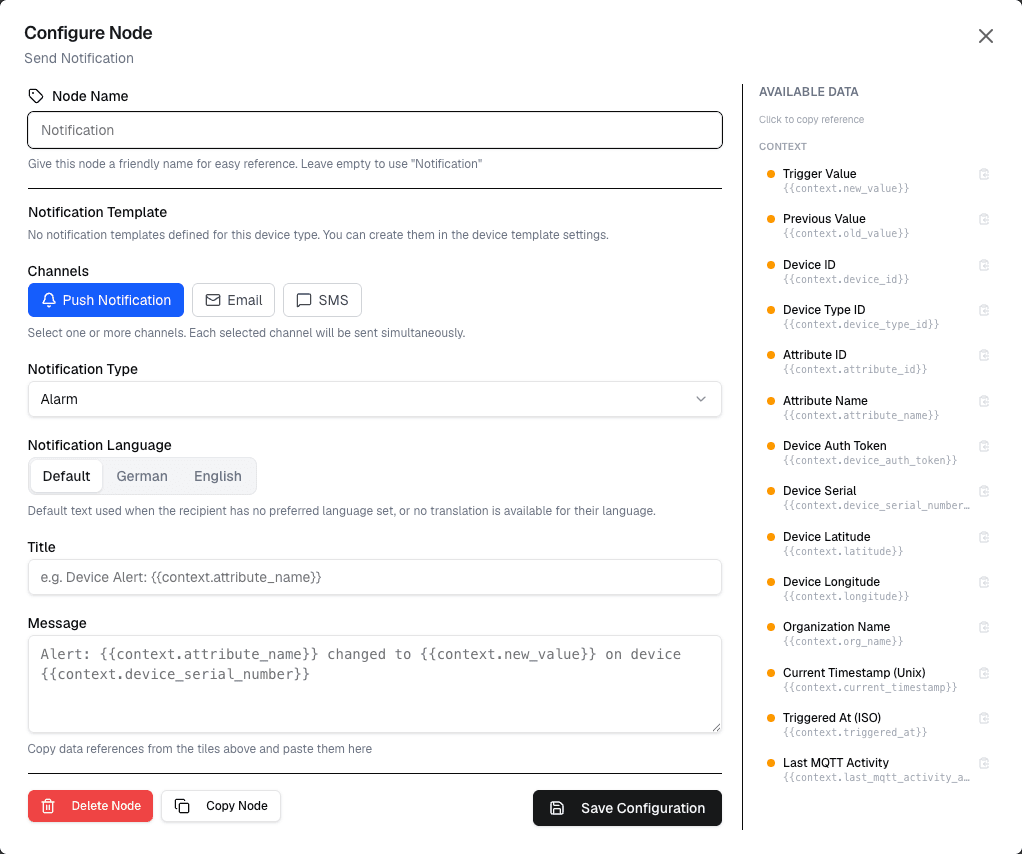
The Notification node sends alerts and notifications when the workflow runs. This is the primary way to notify users or external systems about workflow events.
Overview
The Notification node allows you to send alerts through configured notification channels when specific conditions are met or when workflows complete.
How It Works
- Configure the notification settings (title, message, recipients)
- Map workflow variables into the notification content
- The notification is sent when the workflow executes
Configuration
| Setting | Description |
|---|---|
| Title | Notification title (supports variables) |
| Message | Notification body content |
| Recipients | Select notification recipients or channels |
| Priority | Set notification priority level |
Use Cases
- Alerts — Notify when thresholds are exceeded
- Status updates — Inform about workflow completion or failure
- Event notifications — Alert on specific device events
- Report delivery — Send generated reports to stakeholders
Example: Temperature Alert
Node: Notification
  Title: "High Temperature Alert"
  Message: "Device {device.name} temperature: {temperature}°C exceeds threshold"
  Priority: High
Best Practices
- Keep notification titles concise and informative
- Include relevant context in the message body
- Use variables to personalize notifications
- Set appropriate priority levels to avoid alert fatigue
Limitations
- Notification delivery depends on configured channels
- There may be rate limits on notification frequency
- Each workflow can use only one notification node per branch
Next Steps
Connect condition nodes before the Notification to control when alerts are sent, or follow with action nodes to automate responses.