

MQTT Publish Custom
Publish messages with custom MQTT settings from your workflows.
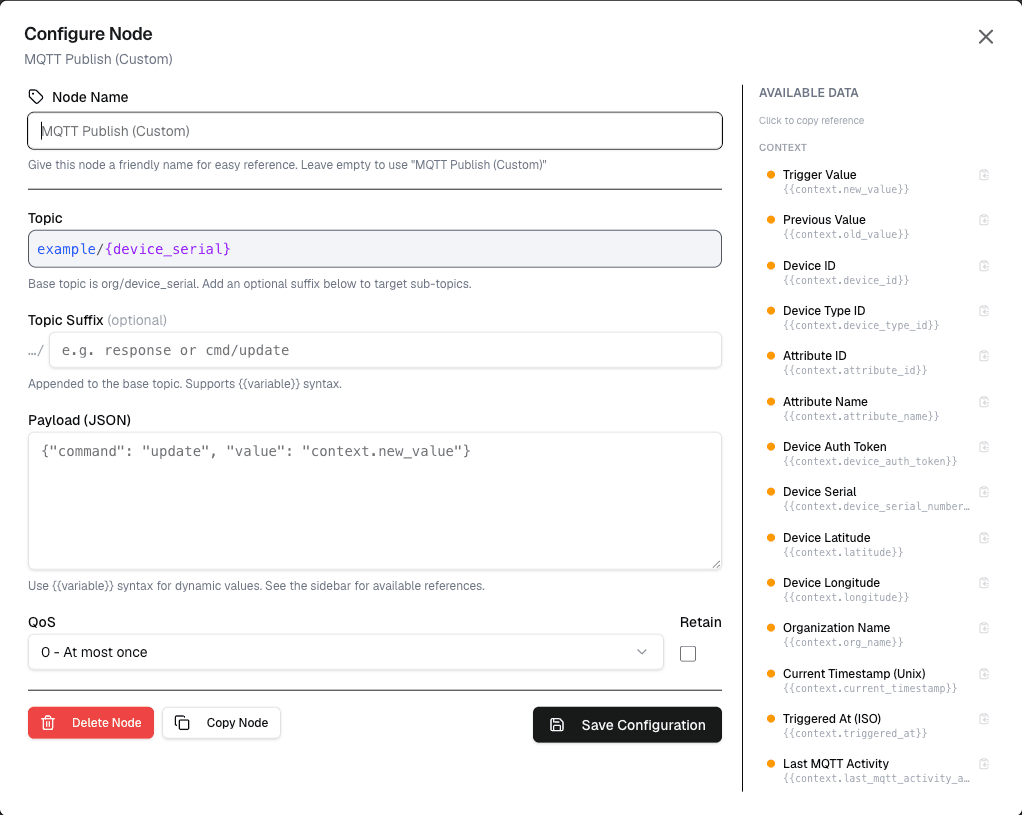
The MQTT Publish Custom node allows you to publish messages to MQTT topics with fully customizable MQTT connection settings, including custom broker, credentials, and TLS configuration.
Overview
While the standard MQTT Publish node uses the device's default credentials, the Custom variant lets you specify entirely custom MQTT connection parameters.
How It Works
- Configure the custom broker, credentials, and connection settings
- Set the topic and payload as usual
- The node connects to the specified broker and publishes the message
Configuration
| Setting | Description |
|---|---|
| Broker URL | Custom MQTT broker address |
| Broker Port | Custom broker port (default: 1883 or 8883 for TLS) |
| Username | Optional username for authentication |
| Password | Optional password for authentication |
| Client Certificate | Optional client certificate for mutual TLS |
| Client Key | Optional client key for mutual TLS |
| Topic | The MQTT topic to publish to |
| Payload | The message payload |
| QoS | Quality of Service level |
Use Cases
- Multi-broker integration — Connect to external MQTT brokers
- Custom security — Use your own certificates and credentials
- Testing — Publish to local or test MQTT brokers
- Bridge scenarios — Connect between different MQTT infrastructures
Example: External Broker
Node: MQTT Publish Custom
  Broker: external.mqtt.broker.com
  Port: 8883
  TLS: Enabled
  Client Certificate: [uploaded]
  Client Key: [uploaded]
  Topic: external/system/commands
  Payload: {"action": "start"}
Best Practices
- Store certificates securely and rotate them regularly
- Use TLS (port 8883) for all production connections
- Test connections to external brokers in a development environment first
- Monitor connection logs for authentication failures
Differences from Standard MQTT Publish
| Feature | MQTT Publish | MQTT Publish Custom |
|---|---|---|
| Broker | Platform broker | Custom broker |
| Credentials | Device certificates | Custom credentials |
| TLS | Automatic | Manual configuration |
| Use Case | Device communication | External integration |
Limitations
- Custom connections may fail due to network restrictions or invalid credentials
- External broker latency affects workflow execution time
- Certificate management adds operational overhead
Next Steps
Connect data nodes to prepare your message payload, or follow with notification nodes to alert on publish success or failure.