

Calculation
Perform mathematical calculations in your workflows.
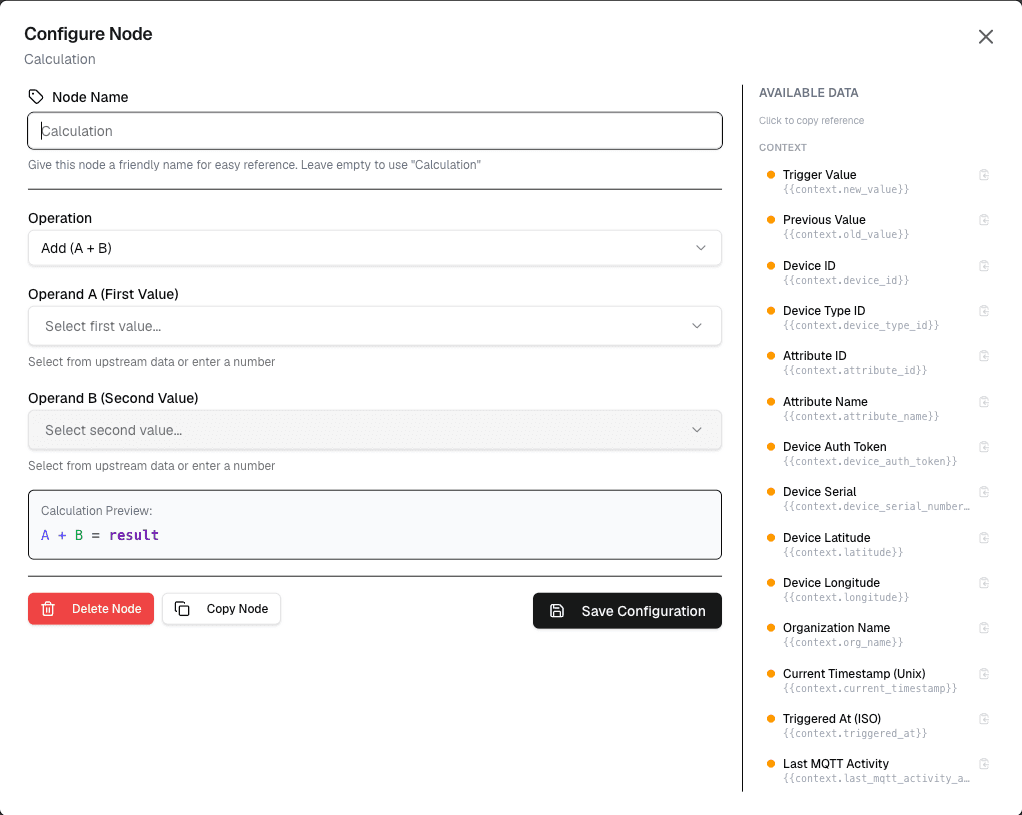
The Calculation node performs mathematical operations on numeric values from your workflow. This is essential for data transformations, threshold calculations, and data normalization.
Overview
The Calculation node supports basic arithmetic operations and can be used to transform data values before passing them to action nodes.
How It Works
- Provide input values (constants or workflow variables)
- Select the calculation operation
- The result is passed to connected nodes
Configuration
| Setting | Description |
|---|---|
| Input A | First operand (number or variable) |
| Operation | Mathematical operation to perform |
| Input B | Second operand (number or variable) |
| Result | Output variable name |
Supported Operations
| Operation | Description | Example |
|---|---|---|
| Add | Addition | 10 + 5 = 15 |
| Subtract | Subtraction | 10 - 5 = 5 |
| Multiply | Multiplication | 10 times 5 equals 50 |
| Divide | Division | 10 / 5 = 2 |
| Modulo | Remainder | 10 % 3 = 1 |
| Power | Exponentiation | 2^3 = 8 |
Use Cases
- Unit conversion — Convert Celsius to Fahrenheit
- Aggregations — Calculate averages, totals
- Thresholds — Determine if values exceed limits
- Data normalization — Scale values to a range
Example: Temperature Conversion
Node: Calculation
  Input A: {celsius}
  Operation: Multiply
  Input B: 1.8
  Result: fahrenheit_base

Node: Calculation
  Input A: {fahrenheit_base}
  Operation: Add
  Input B: 32
  Result: fahrenheit
Best Practices
- Always validate input values before calculation
- Handle division by zero cases
- Use variables for intermediate results
- Document complex calculation chains
Limitations
- Works with numeric values only
- Precision is limited to floating-point accuracy
- Complex expressions require multiple nodes
Next Steps
Connect the calculation output to condition nodes for threshold checks, or to action nodes for automated responses.