

HTTP Request
Make HTTP calls to external APIs from your workflows.
The HTTP Request node sends HTTP requests to external APIs. This enables workflows to integrate with any web service or API.
Overview
The HTTP Request node allows workflows to make GET, POST, PUT, DELETE, and other HTTP calls to external endpoints.
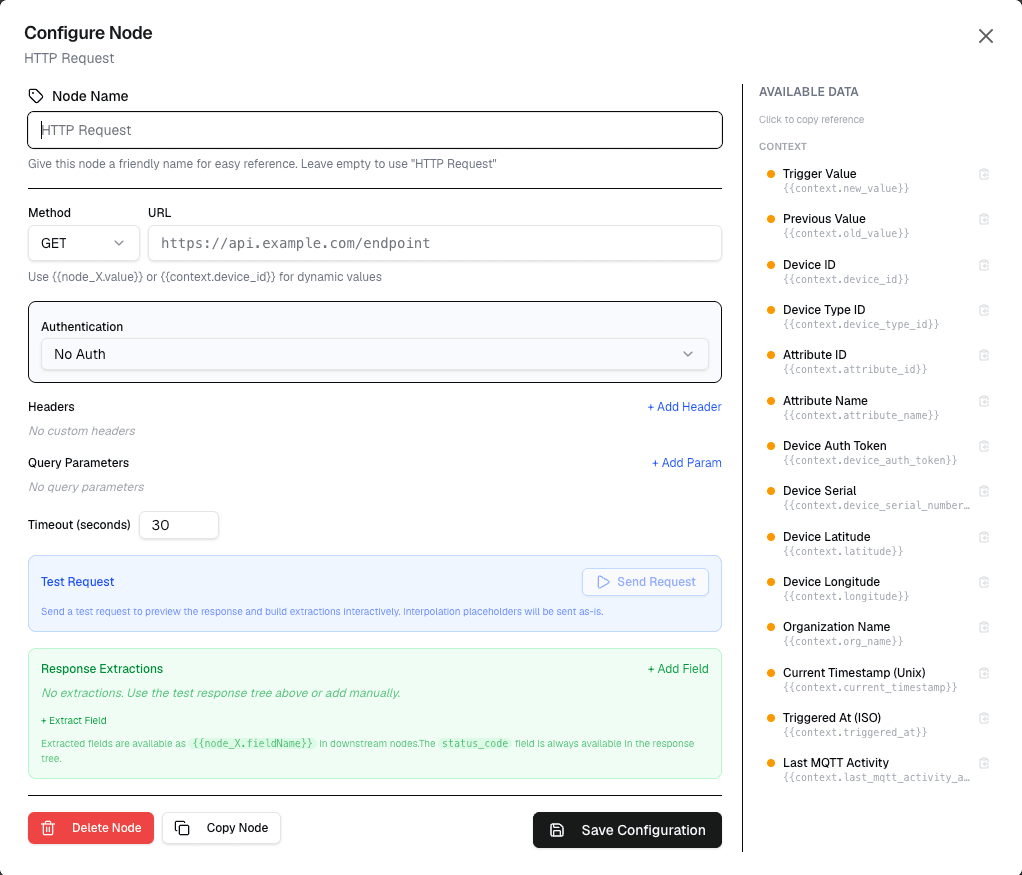
How It Works
- Configure the HTTP method, URL, headers, and body
- The node sends the request when the workflow runs
- The response is available to connected nodes
Configuration
| Setting | Description |
|---|---|
| Method | HTTP method (GET, POST, PUT, DELETE, PATCH) |
| URL | Target endpoint URL (supports variables) |
| Headers | Custom HTTP headers |
| Body | Request body (JSON, form data, raw) |
| Authentication | API key, Basic Auth, or Bearer token |
Use Cases
- External API integration — Send data to external services
- Webhook delivery — Notify external systems of events
- Data synchronization — Sync device data with external databases
- Service calls — Trigger actions in external systems
Example: Send to External API
Node: HTTP Request
  Method: POST
  URL: https://api.example.com/data
  Headers: { "Authorization": "Bearer {apiKey}" }
  Body: {
    "device": "{device.name}",
    "temperature": {temperature}
  }
Best Practices
- Use environment variables for API keys
- Set appropriate timeouts for slow APIs
- Handle error responses in your workflow logic
- Batch requests when possible to reduce API calls
Limitations
- HTTP requests are subject to external API rate limits
- Response size is limited
- Workflows timeout if requests take too long
Next Steps
Connect the response to data nodes for parsing, or to action nodes for conditional responses.