

Formula
Evaluate formula expressions in your workflows.
The Formula node evaluates complex mathematical or logical expressions using variables and functions from your workflow.
Overview
The Formula node allows you to write expressions that combine multiple operations, variables, and functions in a single node — more powerful than individual calculation nodes.
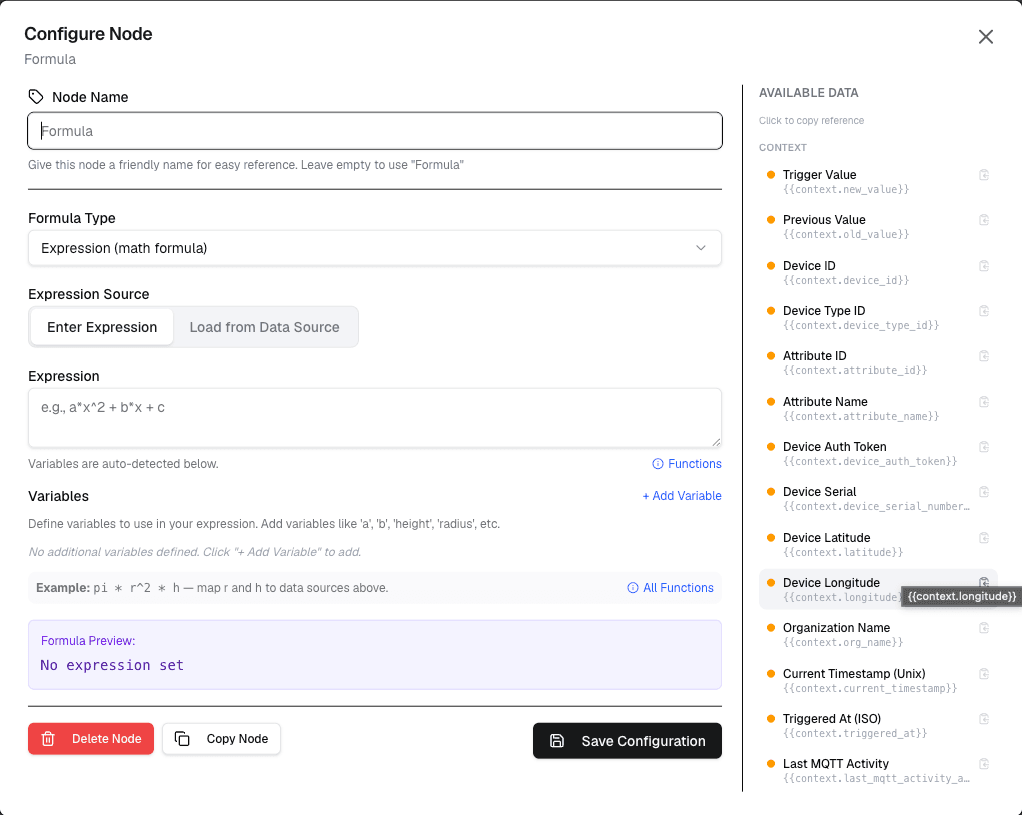
How It Works
- Write a formula expression using workflow variables and operators
- The node evaluates the expression when the workflow runs
- The result is passed to connected nodes
Configuration
| Setting | Description |
|---|---|
| Formula | The expression to evaluate |
| Variables | Available workflow variables |
| Result | Output variable name for the result |
Formula Syntax
Formulas support standard mathematical operators and functions:
| Category | Operators/Functions | Example |
|---|---|---|
| Arithmetic | Plus, minus, asterisk, slash | a + b * 2 |
| Functions | min, max, abs, round, floor, ceil | round(temperature) |
| Logic | and, or, not, if | if(temperature > 30, hot, normal) |
| Math | sqrt, pow, sin, cos, log | sqrt(power) |
Use Cases
- Complex calculations — Multi-step formulas in one node
- Data transformations — Apply formulas to sensor data
- Conditional expressions — Inline if-then-else logic
- Statistical operations — Calculate weighted averages
Example: Weighted Average
Node: Formula
  Formula: (temp * 0.7) + (humidity * 0.3)
  Result: weightedValue

Node: Formula
  Formula: if(weightedValue > 25, alert, ok)
  Result: status
Best Practices
- Use parentheses to control operator precedence
- Keep formulas readable — break complex ones into steps
- Test formulas with sample data before deploying
- Document the purpose of each formula
Limitations
- Formula syntax is limited to supported operators and functions
- Very complex formulas may impact workflow performance
- Debugging formula errors can be challenging
Differences from Calculation Node
| Feature | Calculation | Formula |
|---|---|---|
| Operations | Single operation | Multiple operations |
| Functions | None | Math, logic, conditional |
| Complexity | Simple arithmetic | Complex expressions |
| Readability | Visual configuration | Text-based expression |
Next Steps
Connect the formula output to condition nodes for threshold checks, or to action nodes for automated responses.