

Get History
Fetch historical datastream values for use in workflow processing.
The Get History node retrieves historical datastream values over a specified time period. This is essential for trend analysis, aggregations, and context-aware automation.
Overview
The Get History node queries the platform's datastore and returns historical values for one or more datastreams.
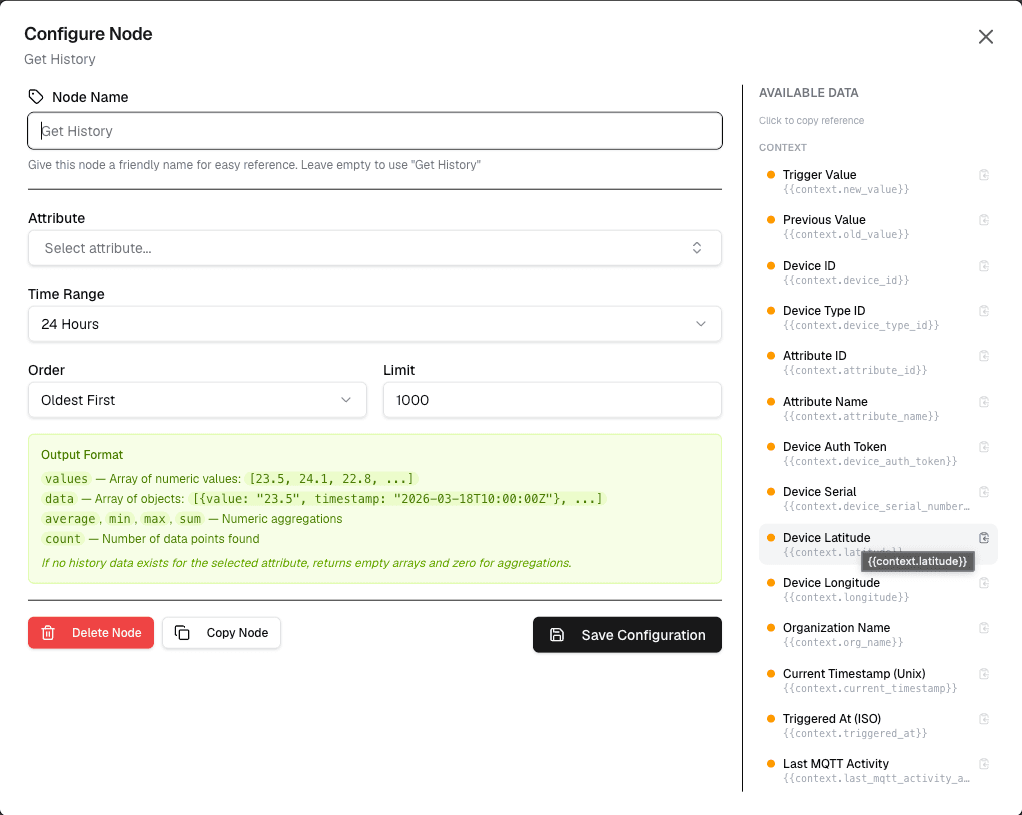
How It Works
- Select the datastream(s) to query
- Set the time range and optional record limit
- The node returns an array of historical values
- Connected nodes can process this array
Configuration
| Setting | Description |
|---|---|
| Datastream | Select the datastream(s) to query |
| Time Range | Start and end time for the query |
| Max Records | Maximum number of records to return |
| Interval | Aggregation interval (e.g., 5min, 1hour) |
Use Cases
- Trend analysis — Analyze data patterns over time
- Aggregations — Calculate averages, min, max over periods
- Context data — Provide historical context for decisions
- Report generation — Include historical data in reports
Example: Hourly Average
Node: Get History
  Datastream: "temperature"
  Time Range: Last 1 hour
  Interval: 5min

→ Output: Array of 12 temperature readings
→ Workflow calculates average
→ Workflow sends report
Best Practices
- Limit time ranges — Only query what you need
- Set record limits — Prevent large data returns
- Use intervals — Aggregate data for longer periods
- Cache results — Avoid repeated queries for same data
Limitations
- Maximum record limit per query
- Time range cannot exceed template configuration
- Query performance depends on data volume
Next Steps
Connect the output to Calculation nodes for aggregations, or to Array Operation nodes for data processing.