

Condition
Add conditional branching logic to your workflows.
The Condition node enables conditional branching in workflows, allowing different paths based on evaluated expressions. This is essential for decision-making automation.
Overview
The Condition node evaluates one or more conditions and routes the workflow execution down different paths based on whether the conditions are true or false.
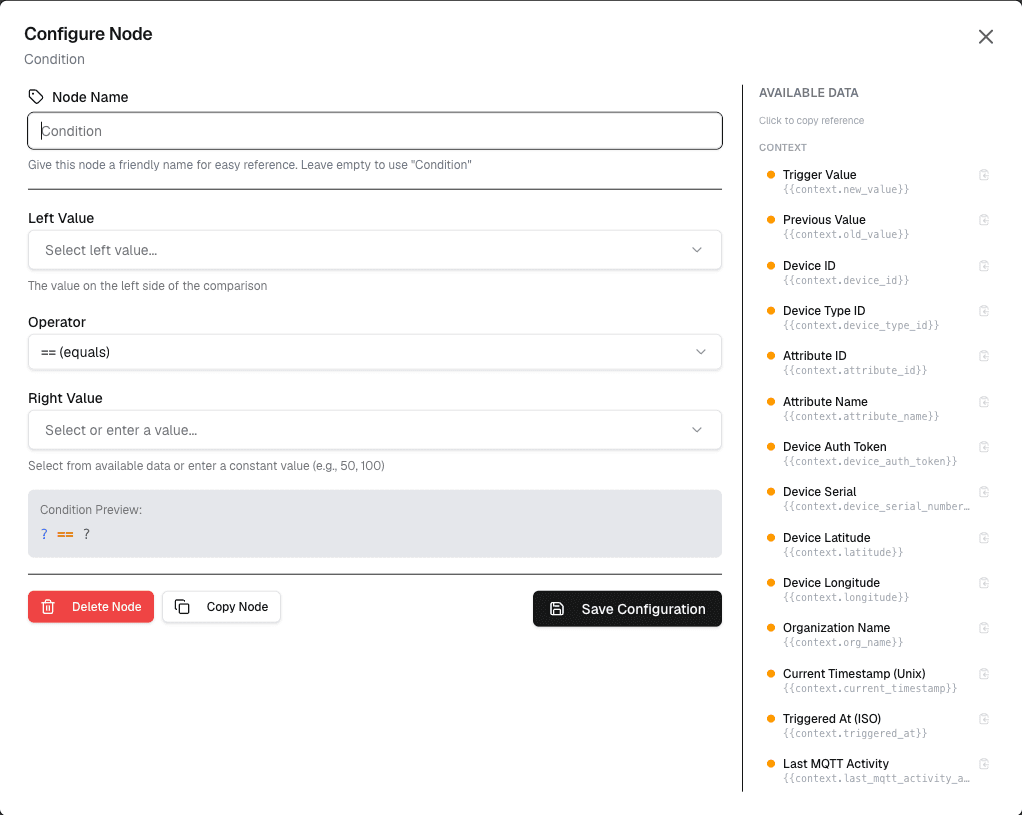
How It Works
- Define the input value to evaluate
- Set the condition (comparison operator and value)
- The workflow branches based on whether the condition is met
Configuration
| Setting | Description |
|---|---|
| Input | The value to evaluate (number, string, or variable) |
| Operator | Comparison operator (greater than, less than, greater or equal, less or equal, equal, not equal) |
| Value | The comparison value |
| Branch | Output variable indicating true/false result |
Supported Operators
| Operator | Description | Example |
|---|---|---|
| Greater than | Greater than | temperature greater than 30 |
| Less than | Less than | pressure less than 1000 |
| Greater or equal | Greater than or equal | value greater than or equal to threshold |
| Less or equal | Less than or equal | value less than or equal to limit |
| Equal to | Equal to | status equals active |
| Not equal to | Not equal to | error not equal none |
Use Cases
- Threshold alerts — Branch if temperature exceeds limit
- Data validation — Route valid vs invalid data
- Status-based actions — Different actions for different states
- Error handling — Branch on success/failure conditions
Example: Temperature Threshold
Node: Condition
  Input: {temperature}
  Operator: >
  Value: 30

True Branch → Send high temperature alert
False Branch → Continue normal processing
Best Practices
- Always handle both true and false branches
- Use descriptive condition names
- Document expected input types
- Test conditions with edge values
Limitations
- Each condition node evaluates a single condition
- Complex logic requires multiple condition nodes
- String comparisons are case-sensitive
Next Steps
Connect the true/false branches to different action nodes for conditional execution paths.